Filters
INFO
Using filters has changed in V 5.2. The old methods are deprecated, but should still work.
Field Filters
Entries can be filtered by a custom field value.
->filters([
    $co->createFieldFilter('topics'),

    $co->createFieldFilter('assignedTo')
        ->label('Responsible')
        ->orderBy('lastName, firstName')
        ->userSelectize(),

    $co->createFieldFilter('workflowStatus')

])
Currently supported:
- Entries fields
- Users fields
- Option fields (Dropdown)

For entries fields you can specify the direction of the relationship:
->direction('out')- both (default): all relationships
- in: Incoming relationships, from the point of view of the selected element.
- out: Outgoing relationships, from the point of view of the selected element.
Matrix subfields can also be used as filters:
 $co->createFieldFilter('streaming.streamingProvider')->orderBy('title')
 $co->createFieldFilter('streaming.digitalMedium.streamingProvider')->orderBy('title')
Specify fields in the form matrixFieldHandle.blockTypeHandle.subFieldHandle.
If there is only one block type, you can use matrixFieldHandle.subFieldHandle
You can use the useSelectize or useElementSelect settings (see below) for a better user experience.
Using element select modals (experimental)
Instead of using a select box you can use Crafts element select modals to pick your filter element.
$co->createFieldFilter('assignedTo')
    ->useElementSelect(),
Allow selection of multiple elements:
$co->createFieldFilter('topics')
    ->useElementSelect()
    ->multiSelectOperator('and')
->selectLimit(10),- The operator
or(default) will find entries that have a relation to at least one selected element. - The operator
andwill find entries that have relations to all selected elements.
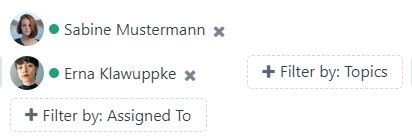
There is also a shortcut for this:
$co->createElementSelectFilter('topics'),

// handle, direction, select multiple elements, operator
$co->createElementSelectFilter('cast.persons', 'in', true, 'and')

$co->createElementSelectFilter('assignedTo', multipleSelect: true, operator: 'and'),
Section filter
Filter by section.
Channel and structure section only.
$co->createSectionFilter()Status filter
Filter by workflow/entry status.
$co->createStatusFilter()->label('Workflow')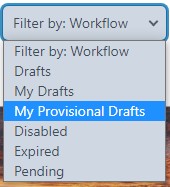
Options are defined in the statusFilterOptions plugin setting.
Custom filters
Additional custom filters can be defined via a custom filter class:
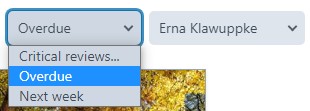
 $co->createCustomFilter(CriticalReviewsFilter::class)
    ->label('Critical Reviews')
    ->handle('criticalreviews')
    ->options([
        ['label' => 'Overdue', 'value' => 'overdue'],
        ['label' => 'Next week', 'value' => 'nextweek'],
    ])
Filter class example.
<?php

namespace modules\contentoverview\filters;

use craft\elements\db\ElementQueryInterface;
use wsydney76\contentoverview\models\filters\CustomFilter;
use wsydney76\contentoverview\models\Section;

class CriticalReviewsFilter extends CustomFilter
{
    public function modifyQuery(Section $sectionConfig, array $filter, ElementQueryInterface $query)
    {
        switch ($filter['value']) {
            case 'overdue':
            {
                $query
                    ->workflowStatus('inReview')
                    ->dueDate('< now');
                break;
            }
            case 'nextweek':
            {
                // ...
            }
        }
    }

}
Specify the modifyQuery function and update the $query parameter.
The $filter parameter will contain handle and value:
[
    'handle' => 'criticalreviews'
    'value' => 'overdue'
]
If additional parameters are fix, you can hardcode them in your class:
$co->createCustomFilter(CriticalReviewsFilter::class);public string $handle = 'criticalreviews';
public string $label = 'Critical Reviews';
public array|Collection $options = [
['label' => 'Overdue', 'value' => 'overdue'],
['label' => 'Next week', 'value' => 'nextweek'],
];Options and the executed query can also be handled via events.
Filter settings
handle
- Type:
string
A unique handle. The field handle for field filters is set by createFieldFilter($handle)
->handle('criticalreviews')label
- Type:
string
The label used for the select box. Defaults to field name for field filters.
->label('Critical Reviews')options
The options used for the select box. Only relevant for custom filters.
- Type:
array|Collection
->options([
        ['label' => 'Overdue', 'value' => 'overdue'],
        ['label' => 'Next week', 'value' => 'nextweek'],
    ])
useSelectize
- Type:
bool - Default:
false
Filters by default use a standard select input. For longer lists of options you may want to switch to a selectize input that allows searching.
->useSelectize()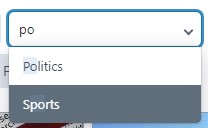
Selectize inputs have a slightly different visual appearance than standard selects, so it is not a very good idea to mix them.
useElementSelect
- Type:
bool - Default:
false
Entries/users field filters only.
Use Crafts element select modal to select elements.
Adding a searchbox to the element select modal
For a better user experience you can also add a search box to the element select modal (Craft 5.8+):
For a simple field with exactly one source, add a withSearch parameter to useElementSelect:
$co->createFieldFilter('manufacturer')
    ->useElementSelect(withSearch: true)
    ->orderBy('title'),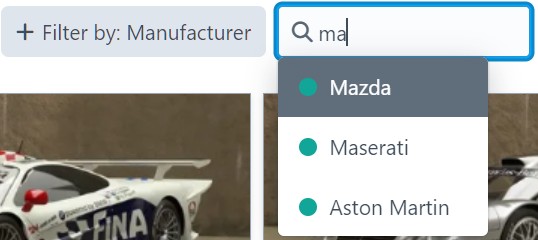
For matrix sub-fields use the searchCriteria setting to specify the criteria for the search box:
searchCriteria
- Type:
array - Default:
[]
Specifies search criteria for the element select search box. Only relevant if useElementSelect is set.
$co->->createFieldFilter('cast.person')
    ->useElementSelect()
    ->searchCriteria([
        'sectionId' => Craft::$app->getEntries()->getSectionByHandle('person')->id,
    ])
selectLimit
- Type:
int - Default:
1
->selectLimit(5)Limit of elements that can be selected in an element select. If multiple elements are selected, this will result in an OR condition.
multiSelectOperator
- Type:
string - Default:
or
->multiSelectOperator('and')Operator if multiple filter elements are selected.
direction
- Type:
string - Default:
both
->direction('in')Direction used for the relatedTo query param.
- both (default): all relationships
- in: Incoming relationships, from the point of view of the selected element.
- out: Outgoing relationships, from the point of view of the selected element.
userGroups
- Type:
string|array
Users field filters only, if useElementSelect is not set. The user group(s) from which the user options will be selected.
->userGroups(['contentEditors', 'festivalAdmin'])INFO
This is a workaround, because the configured sources of the user field are currently not respected.
Filter position
Multiple filters can take up a lot of space if used together with search, so you can push them below or on top of the search in your section config:
// Section config
->filtersPosition('bottom') // top|bottom